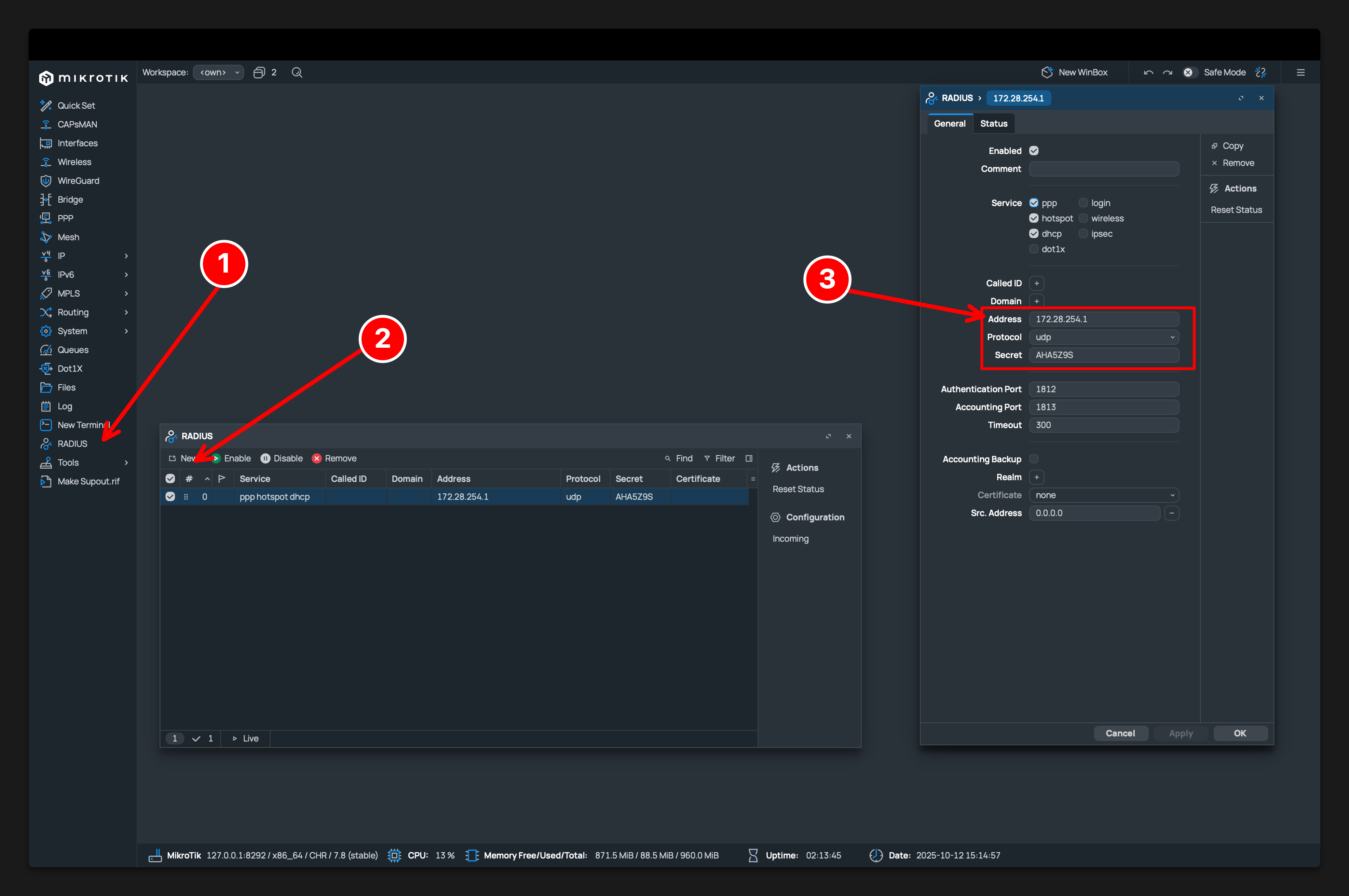
Step 1: Open RADIUS Settings
- Launch WinBox and connect to your MikroTik router.
- Navigate to
Radiusin the main menu.
Step 2: Add a New RADIUS Server
- Click the
+sign to add a new server. - Set up the RADIUS server:
- Service: Select
hotspot,wireless or dhcpas needed. - Address:
172.28.254.1- If you are using WireGuard mode91.98.168.123- If you are using public IP mode - Secret: Enter the shared secret.
- Authentication Port:
1812. - Accounting Port:
1813. - Timeout:
3000ms. - Src. Address: If your router doesn’t have a public IP address and is behind NAT, add your public IP (/32) to an interface and set it as the Src. Address. Otherwise, our system won’t know which IP your router should use!
- Service: Select
Step 3: Save and Verify
- Click
ApplyandOKto save settings. - Ensure there are no firewall rules blocking communication with the RADIUS server.